How to play Mac sound through headphones and speakers at the same time.
Updated · tested on macOS 26
Short answer: macOS plays to one output at a time, but a Multi-Output Device built in Audio MIDI Setup, or the Quwire menu bar app, plays the same sound on your headphones and your speakers together. In one room, Bluetooth’s small delay can sound like an echo.
Setups that work
Built-in, wired and Bluetooth outputs can play together; macOS plays Bluetooth audio on at most 3 devices at a time. People ask about these most:
- AirPods or other Bluetooth headphones and the Mac’s built-in speakers. One person listens close, the room hears the rest.
- Wired headphones and a Bluetooth speaker. Plug the headphones into the headphone jack, or use USB-C headphones you already have.
- AirPods and a JBL, Bose, Sony or other Bluetooth speaker. Both are Bluetooth, so they count toward macOS’s limit of 3.
- An HDMI or DisplayPort TV and headphones. The TV plays for the room while you listen on headphones: see the TV section below.
- A monitor’s or Studio Display’s speakers and desk speakers. Each is its own output.
- A USB DAC and a Bluetooth speaker. If the two run at different sample rates, Quwire handles it.
The built-in way: a Multi-Output Device
These steps follow Apple’s Play audio through multiple devices at once in Audio MIDI Setup on Mac:
- Open Audio MIDI Setup, in the Utilities folder of your Applications folder. Click the Add button (+) at the bottom of the sidebar in the Audio Devices window, then choose Create Multi-Output Device.
- Select the new multi-output device, then select the Use checkbox of your headphones and of your speakers. Choose one of them in the Primary Device pop-up menu.
- Make it your Mac’s output: Control-click it in the sidebar and choose Use This Device for Sound Output, or choose it in System Settings › Sound › Output.
Every step, with drift correction and removal: the Multi-Output Device guide.
What the built-in way can’t do
- The volume keys and Control Center can’t change the volume, so you can’t turn the speakers down from the keyboard. Set each output in Audio MIDI Setup: see why a Multi-Output Device has no volume control.
- You set the primary device, drift correction and sample rates by hand in Audio MIDI Setup; users report crackling when the rates differ.
- It holds one combination. For headphones at the desk and speakers for a party, you build a device for each, and switch back to your usual output by hand.
The Quwire way: pick your headphones and speakers in the menu bar
- Connect your headphones and speakers the way you always do.
- Click Quwire’s q in the menu bar, then click each output you want.
- Turn Quwire on. Apps that use your Mac’s sound output now play on all of them, each output at its own volume where macOS can set it.
Keep a mix for each setup, such as the desk and the party, and switch in one click. Quwire picks the output that keeps time, turns on drift correction for the others and handles outputs at different sample rates. When a mix has both Bluetooth and wired outputs, it tells you to expect a small echo between them. Turn it off, and your Mac goes back to the output it used before.
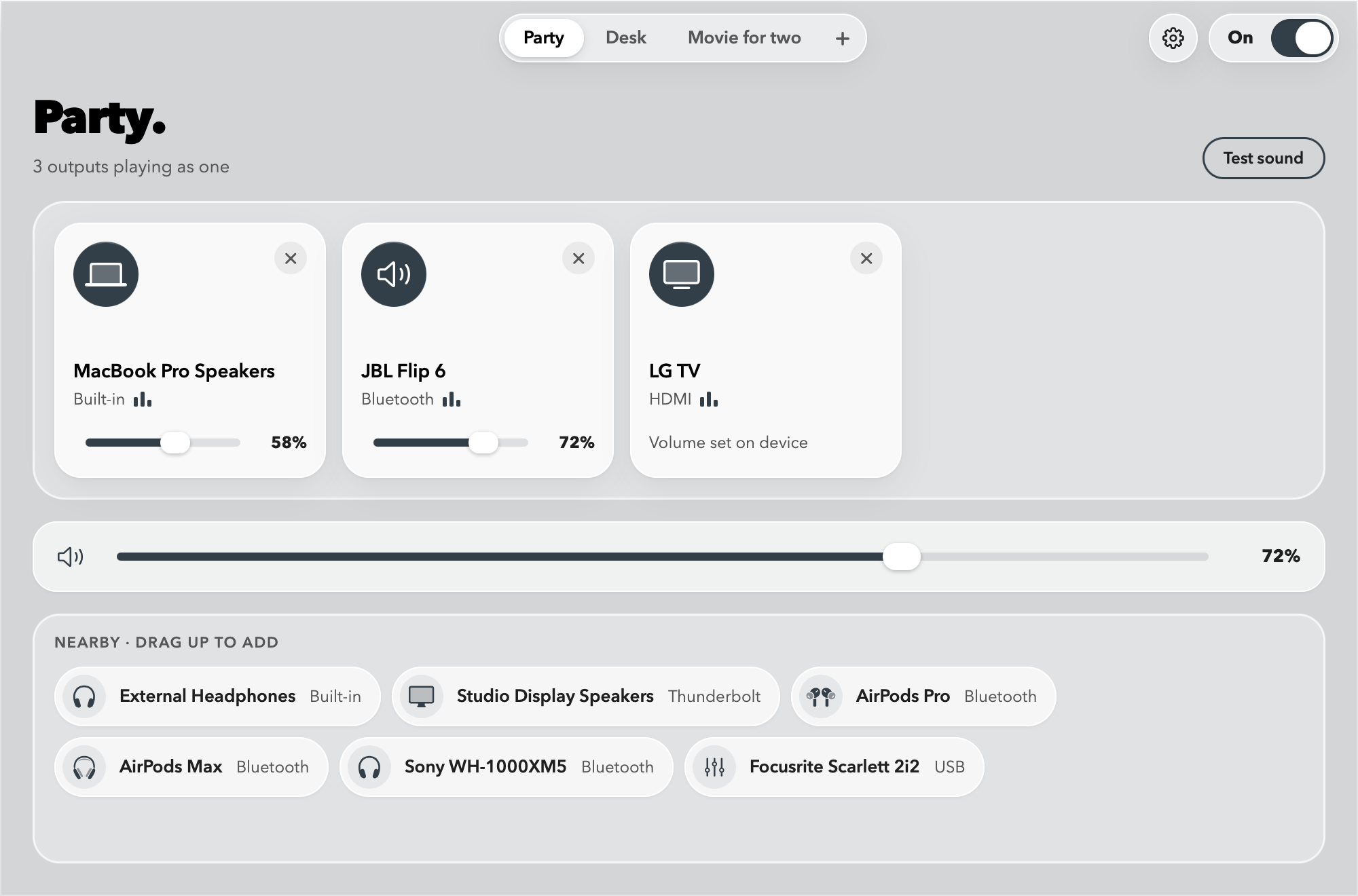
Quwire’s limits. It plays the same sound on every output: no app on one output and another app on the next. It doesn’t remove the Bluetooth delay. AirPlay speakers, HomePod and AirPlay TVs can’t join a mix yet. macOS plays Bluetooth audio on at most 3 devices at a time, and the volume keys can’t change the combined output.
Why is there a delay between Bluetooth and speakers?
Bluetooth headphones and speakers play a moment later than built-in and wired outputs. Heard in the same room, say from the Mac’s speakers and a Bluetooth speaker, the two can sound out of sync, like a short echo. Neither way removes that delay: a Multi-Output Device doesn’t, and neither does Quwire. When each person hears only their own output, such as their own pair of headphones, there’s no echo. More in support: why there’s an echo or delay.
Mac sound on an HDMI or DisplayPort TV and headphones at the same time
A TV connected to your Mac by HDMI or DisplayPort is a wired output, so it can play in a Multi-Output Device or a Quwire mix next to your AirPods or other headphones: the TV plays for the room while you listen on headphones.
- Many TVs don’t let macOS set their volume. In Quwire such a TV shows “Volume set on device”: use the TV’s own remote.
- With Bluetooth headphones in the same room as the TV, you may hear the TV a moment before your headphones.
- AirPlay TVs, Apple TV included, can’t join a Quwire mix yet.
Good to know
- Bluetooth plays a moment late, so Bluetooth and wired outputs in one room can sound like an echo.
- No AirPlay yet: AirPlay speakers, HomePod and AirPlay TVs don’t appear in Quwire for now.
- Up to 3 Bluetooth audio devices play at once, a macOS limit. Wired outputs don’t count toward this limit.
- The same sound plays everywhere: Quwire doesn’t send one app to the headphones and another to the speakers.
- Free to try in the TestFlight beta. On the Mac App Store: a free trial, then a one-time price, no subscription.
Related guides
-
Two AirPods
How to connect two AirPods to one Mac.
Both pairs play the same sound, each at its own volume. Two ways to set it up.
-
Volume
Why a Multi-Output Device has no volume control.
Set each output’s volume, and what Quwire’s sliders and shortcuts add.
-
Multiple outputs
Multiple audio outputs with a Multi-Output Device.
Create one step by step, fix what goes wrong, and remove it again.
Try Quwire in the beta.
Quwire is in beta on TestFlight. Ask for an invite, and tell me how it sounds.
Join the betamacOS 15 or later · Apple silicon, and Intel Macs up to macOS 26
Questions
Can I use AirPods and my MacBook speakers at the same time?
Yes. Add both to a Multi-Output Device, or pick both in Quwire. The AirPods play a moment after the speakers, so close to the speakers the two can sound like an echo.
Can I play sound through the headphone jack and a Bluetooth speaker at once?
Yes. Headphones on the jack and a Bluetooth speaker are separate outputs, so either way plays both.
Can the speakers and the headphones play different things?
No. Both ways play the same sound on every output. Sending each app to its own output is per-app routing, which tools such as SoundSource do.
Does it work with a HomePod or another AirPlay speaker?
Not with Quwire yet. AirPlay speakers, HomePod and AirPlay TVs don’t appear in Quwire for now. A TV on HDMI or DisplayPort works, because it’s a wired output.