Why a Mac Multi-Output Device has no volume control, and what to do.
Updated · tested on macOS 26
Short answer: macOS gives a Multi-Output Device no volume of its own, so the volume keys and Control Center can’t change it. Set each output’s volume in Audio MIDI Setup instead, or use a menu bar app such as Quwire for one slider, shortcuts and a volume per output.
Why the volume keys stop working with a Multi-Output Device
A Multi-Output Device sends the same sound to several outputs, and each of them keeps its own volume: your AirPods have one, the speaker another. macOS has no single volume to set for the combination. So while a Multi-Output Device is your Mac’s output, the keyboard’s volume keys do nothing, Control Center can’t change it, and macOS shows no volume slider for it in Sound settings.
That’s how macOS treats any combined output, not a fault in your setup. It happens with two pairs of AirPods, with AirPods and a speaker, and with Quwire’s combined output too.
The built-in way: set each output’s volume in Audio MIDI Setup
Audio MIDI Setup, where you build a Multi-Output Device, also sets each output’s volume. These steps follow Apple’s guide, Set up audio devices in Audio MIDI Setup on Mac:
- Open Audio MIDI Setup. It’s in the Utilities folder of your Applications folder.
- In the sidebar of the Audio Devices window, select one of the outputs in your Multi-Output Device, such as your AirPods: the output itself, not the Multi-Output Device.
- On the right side of the window, drag the Volume sliders, one for each channel. They’re blue when macOS can set that output’s volume.
- Do the same for each output in the Multi-Output Device.
What the built-in way can’t do
- There’s no one control for the whole mix. To make everything louder, raise each output in turn.
- The volume keys and Control Center still can’t change it.
- Every change in the middle of a movie means a trip to Audio MIDI Setup, one output at a time.
- An output whose volume macOS can’t set, such as many HDMI or DisplayPort TVs, has no working volume slider on the Mac. Use the TV’s remote or the speaker’s own buttons.
The Quwire way: one slider, shortcuts and a volume per output
Quwire builds the combined output for you from the menu bar, and adds the volume controls that macOS leaves out:
- One master slider, in the menu bar window and in the Quwire window. It turns the whole mix up or down and keeps each output’s level relative to the others.
- A volume for each output in the Quwire window: louder for one pair of AirPods, softer for the other.
- Volume up and Volume down shortcuts for the master volume. They come without keys: pick your own in Settings › Shortcut.
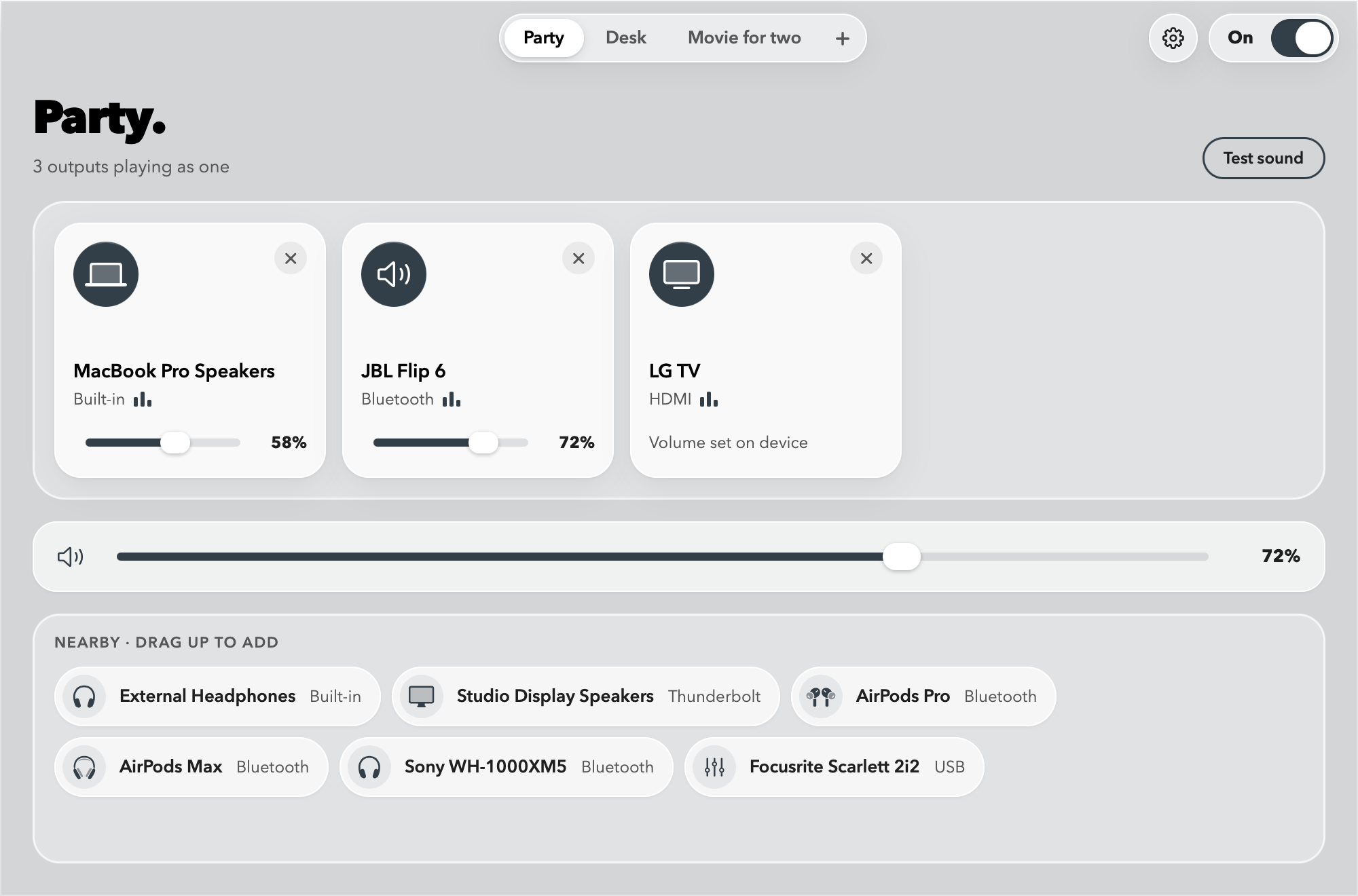
Quwire’s limits. The volume keys and Control Center can’t change Quwire’s combined output either: macOS gives it no volume of its own. An output whose volume macOS can’t set shows “Volume set on device” in Quwire and keeps its own remote or buttons. And macOS plays Bluetooth audio on at most 3 devices at a time.
Good to know
- The keyboard’s volume keys can’t change a combined output, whether it’s a Multi-Output Device or Quwire’s.
- Up to 3 Bluetooth audio devices play at once, a macOS limit. Wired outputs don’t count toward this limit.
- Turn Quwire off, and your output, input, volumes and sample rates come back.
- Free to try in the TestFlight beta. On the Mac App Store: a free trial, then a one-time price, no subscription.
Related guides
-
Two AirPods
How to connect two AirPods to one Mac.
Both pairs play the same sound, each at its own volume. Two ways to set it up.
-
Multiple outputs
Multiple audio outputs with a Multi-Output Device.
Create one step by step, fix what goes wrong, and remove it again.
Try Quwire in the beta.
Quwire is in beta on TestFlight. Ask for an invite, and tell me how it sounds.
Join the betamacOS 15 or later · Apple silicon, and Intel Macs up to macOS 26
Questions
Why are my Mac’s volume keys not working?
If your Mac’s output is a Multi-Output Device, a Quwire mix, or an HDMI or DisplayPort display whose volume macOS can’t set, the keys have nothing to change. Otherwise, check which output is selected in Control Center › Sound.
Why can’t I change the volume on my Mac with AirPods?
If the AirPods are part of a Multi-Output Device or a Quwire mix, the combined output has no volume control. Change the AirPods’ own volume in Audio MIDI Setup, or with their slider in Quwire. On their own, AirPods follow the volume keys as usual.
Why does Sound settings show no volume slider?
Sound settings shows no volume slider for an output whose volume macOS can’t set. A Multi-Output Device is one, and so are many HDMI or DisplayPort TVs. Set the volume on each output in the Multi-Output Device, or on the TV itself.
How do I make a Multi-Output Device louder?
Raise each output’s own volume in Audio MIDI Setup. The combined device has no level of its own to raise. Also check the volume in the app that’s playing: it can’t go above the Mac’s. In Quwire, raise that output’s slider, then the master slider.
Does Quwire fix the volume keys?
No. macOS gives a combined output no volume, so the keys can’t change Quwire’s either. Quwire gives you a master slider, Volume up and Volume down shortcuts, and a volume for each output instead.
Can each person have their own volume?
Yes. In Quwire, each output in the mix has its own volume, so one pair of AirPods can play louder than the other. With a Multi-Output Device, set each output in Audio MIDI Setup.